


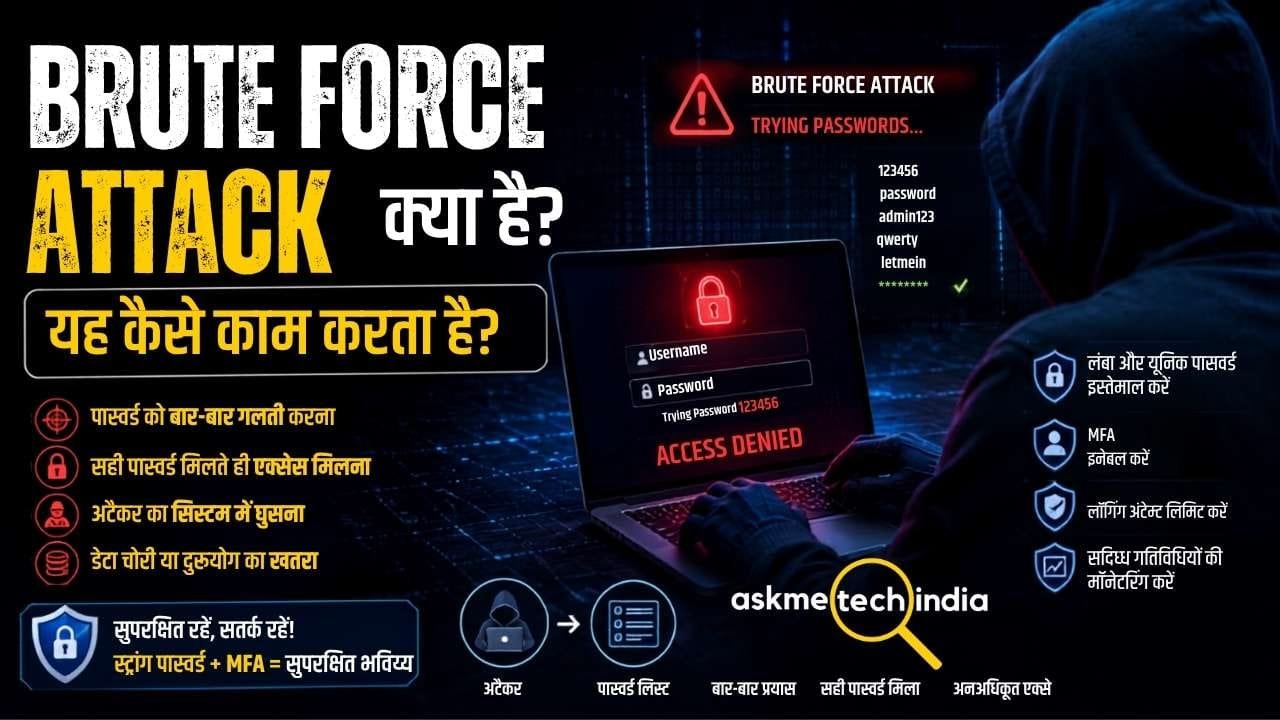
Brute Force Attack एक ऐसा cyber attack है जिसमें attacker किसी account, system या protected data तक unauthorized access पाने के लिए password या अन्य authentication credentials के कई संभावित combinations को बार-बार आजमाता है।
सरल भाषा में समझें तो इसमें attacker किसी password को सीधे जानने के बजाय बार-बार अलग-अलग passwords try करके सही password खोजने की कोशिश करता है। CISA भी brute-force attack को password attacks के सबसे सरल रूपों में बताता है, जिसमें अलग-अलग passwords आजमाए जाते हैं।
उदाहरण के लिए, अगर किसी account का password 123456 है और attacker संभावित passwords को एक-एक करके try करता है, तो सही combination मिलने पर account compromise हो सकता है।
हालांकि modern systems में login attempts पर rate limiting, account lockout और MFA जैसी सुरक्षा मौजूद होने के कारण traditional online brute-force attack हमेशा आसान नहीं होता। दूसरी तरफ, यदि attacker को password database का offline copy मिल जाए, तो password guessing या cracking के लिए बहुत अधिक attempts किए जा सकते हैं।
Brute Force Attack क्या है?
Brute Force Attack का मतलब है लगातार संभावित credentials आजमाकर सही credential खोजने की कोशिश करना।
इसमें attacker आमतौर पर अनुमान, automation और computing power का इस्तेमाल करता है।
एक सामान्य उदाहरण:
Username → Password 1 → गलत
Username → Password 2 → गलत
Username → Password 3 → गलत
…
Username → सही Password → Unauthorized Access
अगर password छोटा, common या आसानी से अनुमान लगाने योग्य है, तो उसे खोजने की संभावना बढ़ सकती है।
NIST के अनुसार password की length बढ़ने से संभावित combinations की संख्या तेजी से बढ़ती है, जिससे brute-force guessing कठिन होती है।
एक सामान्य brute-force attack को इन steps से समझा जा सकता है:
1. Target की पहचान
सबसे पहले attacker किसी target को चुनता है।
यह target हो सकता है:
- Online account
- Email account
- Web application
- Server
- Wi-Fi authentication
- Computer login
- Database
- किसी encrypted file या password-protected data का credential
2. Username या Account की जानकारी प्राप्त करना
अगर attack login system पर किया जा रहा है, तो attacker को अक्सर username या account identifier की आवश्यकता होती है।
यह information अलग-अलग तरीकों से प्राप्त हो सकती है।
3. Password Guessing शुरू होती है
इसके बाद attacker संभावित passwords को बार-बार try करता है।
उदाहरण:
123456
password
qwerty
admin123
और फिर अन्य combinations।
वास्तविक attacks में यह प्रक्रिया automated tools और बहुत बड़ी संख्या में guesses के साथ हो सकती है।
4. सही Credential मिलने की कोशिश
अगर किसी attempt में सही password मिल जाता है और additional security controls मौजूद नहीं हैं, तो attacker account में unauthorized access प्राप्त कर सकता है।
5. Account का Misuse
Access मिलने के बाद attacker account के permissions के अनुसार:
- Data देख सकता है|
- Information चोरी कर सकता है|
- Account settings बदल सकता है|
- अन्य accounts तक पहुंचने की कोशिश कर सकता है|
- Malware deploy कर सकता है|
- Organization के network में आगे बढ़ सकता है|
इसलिए brute force का खतरा केवल password guess होने तक सीमित नहीं है।
Brute Force Attack का आसान उदाहरण
मान लीजिए किसी account का password केवल 4-digit PIN है।
संभावित combinations:
0000
0001
0002
…
9999
कुल 10,000 combinations हो सकते हैं।
यदि system unlimited attempts की अनुमति देता हो, तो attacker automation की मदद से बड़ी संख्या में combinations try कर सकता है।
लेकिन अगर system हर गलत attempt के बाद delay लगाए, attempts को rate-limit करे या account को temporarily lock कर दे, तो attack काफी कठिन हो जाता है।
इसीलिए modern authentication systems में rate limiting, failed-login detection और MFA जैसी protections महत्वपूर्ण हैं। NIST online brute-force attacks के खिलाफ rate limiting का उपयोग करने की सलाह देता है।
Cyber Crime क्या है? इसके प्रकार, बचाव और भारत में शिकायत करने का तरीका जानने के लिए यह साइबर अपराध की पूरी जानकारी और शिकायत प्रक्रिया जरूर पढ़ें।
Brute Force Attack के प्रमुख प्रकार
Brute-force attacks केवल एक तरीके से नहीं होते। अलग-अलग techniques का इस्तेमाल किया जा सकता है।
1. Simple Brute Force Attack
यह इसका सबसे basic form है।
Attacker संभावित passwords या combinations को systematically try करता है।
यह approach तब अधिक प्रभावी हो सकती है जब password छोटा या predictable हो।
2. Dictionary Attack
इसमें attacker हर possible character combination try करने के बजाय common words और passwords की list का इस्तेमाल करता है।
उदाहरण:
- password
- admin
- welcome
- qwerty
- 123456
यह technically pure brute force से अलग approach है, क्योंकि इसमें पहले से ज्ञात/common शब्दों की सूची का उपयोग किया जाता है।
3. Hybrid Attack
Hybrid attack में common words के साथ numbers, symbols या अन्य variations जोड़ी जा सकती हैं।
उदाहरण के लिए किसी common word के साथ year या numbers जोड़कर variations बनाए जा सकते हैं।
4. Password Spraying
Password spraying में attacker बहुत सारे usernames के खिलाफ कुछ common passwords आजमाता है।
उदाहरण:
User 1 → Common Password
User 2 → Common Password
User 3 → Common Password
इसका उद्देश्य हर account पर बहुत सारे failed attempts करके account lockout trigger करने से बचना हो सकता है। CISA password spraying को brute-force techniques से संबंधित attack के रूप में पहचानता है।
5. Credential Stuffing
Credential stuffing में attacker पहले से leaked username-password combinations का उपयोग दूसरे services पर login करने के लिए करता है।
यह pure brute-force guessing नहीं है, क्योंकि attacker नए passwords guess करने के बजाय पहले से compromised credentials का उपयोग करता है।
CISA brute force, password spraying और credential stuffing को अलग-अलग credential-based attack techniques के रूप में बताता है।
6. Offline Password Cracking
यह online login attack से अलग स्थिति है।
अगर attacker को किसी system का password database या password hashes मिल जाते हैं, तो वह offline environment में passwords guess/crack करने की कोशिश कर सकता है।
इसमें attacker को हर guess के लिए real website पर login करने की आवश्यकता नहीं होती।
NIST बताता है कि breached password database की offline copy मिलने पर attacker बहुत बड़ी संख्या में guesses कर सकता है।
Online और Offline Brute Force में क्या अंतर है?
| Online Brute Force | Offline Password Cracking |
|---|---|
| Real login system पर attempts होते हैं | Obtained password data/hashes पर काम किया जाता है |
| Server attempts को detect कर सकता है | Attacker local resources पर guesses कर सकता है |
| Rate limiting मदद कर सकती है | Rate limiting सीधे लागू नहीं होती |
| Account lockout attack को धीमा कर सकता है | Strong password hashing महत्वपूर्ण है |
| MFA बहुत उपयोगी protection है | Strong password और secure password storage महत्वपूर्ण हैं |
इसलिए online और offline attacks के लिए security strategy भी अलग-अलग हो सकती है।
Brute Force और Password Spraying में अंतर
इन दोनों को अक्सर एक ही समझ लिया जाता है, लेकिन इनमें अंतर है।
Brute Force:
एक account के खिलाफ कई अलग-अलग passwords आजमाए जा सकते हैं।
Password Spraying:
बहुत सारे accounts के खिलाफ कुछ common passwords आजमाए जाते हैं।
उदाहरण:
Brute Force
User A → Password 1
User A → Password 2
User A → Password 3
User A → Password 4
Password Spraying
User A → Common Password
User B → Common Password
User C → Common Password
User D → Common Password
CISA भी इन techniques को अलग-अलग attack methods के रूप में पहचानता है।
Brute Force और Credential Stuffing में अंतर
Brute Force:
Attacker passwords को guess करने की कोशिश करता है।
Credential Stuffing:
Attacker पहले से leaked username-password combinations को दूसरे accounts/services पर इस्तेमाल करता है।
उदाहरण के लिए, अगर किसी website से आपका username और password leak हो गया और आपने वही password दूसरी website पर भी इस्तेमाल किया, तो attacker leaked credentials को दूसरी service पर आजमा सकता है।
इसीलिए हर important account के लिए unique password रखना बहुत जरूरी है।
अगर आप अपने डिवाइस को खतरनाक साइबर खतरों से सुरक्षित रखना चाहते हैं, तो Malware, Virus, Trojan और Ransomware से बचने के आसान तरीके जानें और अपनी ऑनलाइन सुरक्षा को बेहतर बनाएं।
Brute Force Attack सफल क्यों हो सकता है?
कुछ common कारण हैं:
कमजोर Password
छोटा या आसानी से अनुमान लगाने योग्य password जल्दी guess हो सकता है।
Password Reuse
एक ही password कई websites पर इस्तेमाल करने से एक breach का असर दूसरे accounts पर भी पड़ सकता है।
MFA Enabled न होना
अगर केवल password ही authentication का एकमात्र factor है, तो password compromise होने पर account takeover का जोखिम बढ़ जाता है।
Unlimited Login Attempts
अगर system बहुत अधिक failed attempts की अनुमति देता है, तो automated guessing आसान हो सकती है।
Rate Limiting का न होना
Rate limiting attacker की attempts को धीमा कर सकती है। इसके बिना automated attacks अधिक तेजी से चल सकते हैं।
कमजोर Password Storage
अगर password database सुरक्षित तरीके से stored नहीं है और attacker उसे प्राप्त कर लेता है, तो offline password cracking का खतरा बढ़ सकता है।
Brute Force Attack से कैसे बचें?
Brute-force attacks से बचने के लिए user और website/system दोनों स्तर पर security measures जरूरी हैं।
1. लंबा और मजबूत Password इस्तेमाल करें
Password की length बहुत महत्वपूर्ण है।
NIST की current consumer guidance password को कम से कम 15 characters का रखने की सलाह देती है और passphrases का उपयोग एक practical तरीका बताती है।
उदाहरण के लिए, छोटे predictable password की तुलना में लंबी और unique passphrase अधिक मजबूत हो सकती है।
2. हर Account के लिए Unique Password रखें
एक ही password को कई websites पर इस्तेमाल न करें।
अगर एक service का password leak हो जाए, तो दूसरे accounts भी खतरे में आ सकते हैं।
3. Password Manager का इस्तेमाल करें
Password manager आपके लिए लंबे और unique passwords generate और store कर सकता है।
NIST भी password manager के उपयोग की recommendation देता है।
4. MFA Enable करें
Multi-Factor Authentication (MFA) account security की एक महत्वपूर्ण अतिरिक्त layer है।
यदि attacker को password पता भी चल जाए, तो MFA enabled होने पर उसे दूसरे authentication factor की आवश्यकता हो सकती है।
CISA credential-based attacks से बचाव के लिए MFA को महत्वपूर्ण protection मानता है।
5. Login Attempts को Limit करें
Website और application developers को failed login attempts पर:
- Rate limiting
- Progressive delays
- Temporary lockout
- Risk-based authentication
- Suspicious login detection
जैसे controls लागू करने चाहिए।
NIST online brute-force attacks के लिए rate limiting को महत्वपूर्ण defense बताता है।
6. Common और Compromised Passwords को Block करें
सिस्टम को commonly used या पहले से compromised passwords को reject करने के लिए password blocklist का इस्तेमाल करना चाहिए।
NIST की authentication guidance known compromised और commonly used passwords को block करने की recommendation देती है।
7. Default Password बदलें
Router, server, IoT device या किसी अन्य system का default password छोड़ना सुरक्षा जोखिम पैदा कर सकता है।
पहली setup के दौरान default credentials बदलना चाहिए।
8. Login Activity Monitor करें
Organizations को failed login attempts और unusual authentication activity monitor करनी चाहिए।
उदाहरण:
- बहुत सारे failed attempts
- कई usernames पर login attempts
- Unusual geographic location
- Unusual device
- असामान्य समय पर login
ऐसी गतिविधियां suspicious authentication behavior का संकेत हो सकती हैं।
Website में Brute Force Attack से कैसे बचाएं?
अगर आप website या web application manage करते हैं, तो केवल strong passwords की सलाह देना पर्याप्त नहीं है।
Authentication system में कई layers होनी चाहिए:
Strong Password Policy
↓
Rate Limiting
↓
Failed Login Monitoring
↓
MFA
↓
Suspicious Login Detection
↓
Alerting & Logging
इस layered approach से automated credential attacks का risk कम किया जा सकता है।
CISA के cybersecurity guidance में automated credential-based attacks के खिलाफ failed-login detection, changing default passwords और MFA जैसे controls को महत्वपूर्ण बताया गया है।
क्या Brute Force Attack को पहचान सकते हैं?
हाँ, कुछ संकेत suspicious brute-force activity की ओर इशारा कर सकते हैं।
उदाहरण:
- बहुत ज्यादा failed login attempts
- एक account पर लगातार password attempts
- कई accounts पर समान password attempts
- Unusual IP addresses से authentication requests
- अचानक account lockouts बढ़ जाना
- Login attempts की असामान्य frequency
- Successful login के बाद unusual activity
Organizations इन activities को logs और security monitoring systems के माध्यम से detect कर सकती हैं।
अगर Brute Force Attack का पता चले तो क्या करें?
अगर किसी account या system पर brute-force activity दिखाई दे तो:
- Suspicious login activity की जांच करें।
- प्रभावित account को temporarily secure करें।
- Password बदलें।
- MFA enable करें।
- Active sessions को review/revoke करें।
- Login logs और source information की जांच करें।
- अन्य accounts में भी similar activity देखें।
- जरूरत पड़ने पर security team या service provider को report करें।
अगर password compromise होने का संदेह हो तो उसी password को दूसरे accounts पर भी इस्तेमाल किया गया है या नहीं, यह जरूर जांचें।
क्या Brute Force Attack खतरनाक है?
हाँ।
अगर attacker सही credentials प्राप्त कर लेता है, तो account takeover हो सकता है। इसके बाद attacker account की permissions के अनुसार sensitive data तक पहुंचने या आगे attack करने की कोशिश कर सकता है।
विशेष रूप से business environments में compromised account आगे के cyber attacks के लिए entry point बन सकता है।
इसलिए brute force को केवल “password guessing” समझकर ignore नहीं करना चाहिए।
Brute Force Attack और Hacking में क्या संबंध है?
Brute Force Attack एक attack technique है, जबकि hacking एक व्यापक concept है जिसमें unauthorized access प्राप्त करने के लिए अलग-अलग techniques का इस्तेमाल किया जा सकता है।
Brute force उन techniques में से एक है जिनका उपयोग attacker credentials compromise करने के लिए कर सकता है।
Brute Force Attack से जुड़े FAQs
Brute Force Attack क्या होता है?
Brute Force Attack में attacker लगातार अलग-अलग संभावित passwords या credentials आजमाकर सही authentication information खोजने की कोशिश करता है।
क्या Brute Force Attack केवल Password पर होता है?
नहीं। यह authentication systems में passwords, PINs और अन्य secrets/credentials को guess करने के संदर्भ में भी हो सकता है। NIST के Mobile Threat Catalogue में PIN/password brute force को authentication threat के रूप में सूचीबद्ध किया गया है।
क्या मजबूत Password Brute Force Attack को रोक सकता है?
लंबा और unpredictable password guessing को बहुत कठिन बना सकता है। लेकिन केवल password पर निर्भर रहना पर्याप्त नहीं है; MFA, rate limiting और अन्य security controls भी महत्वपूर्ण हैं।
क्या MFA Brute Force से बचाता है?
MFA account security की एक अतिरिक्त layer देता है। यदि password compromise हो भी जाए, तो attacker को दूसरे factor की आवश्यकता पड़ सकती है। CISA credential-based attacks के खिलाफ MFA को महत्वपूर्ण protection बताता है।
क्या Password Manager सुरक्षित है?
एक reputable password manager लंबे और unique passwords बनाने तथा उन्हें सुरक्षित तरीके से manage करने में मदद कर सकता है। NIST password manager के उपयोग की recommendation देता है।
Brute Force और Password Spraying क्या एक ही हैं?
नहीं। Brute force में कई passwords एक account के खिलाफ आजमाए जा सकते हैं, जबकि password spraying में कुछ common passwords को कई accounts के खिलाफ आजमाया जाता है।
क्या Credential Stuffing भी Brute Force है?
Credential stuffing related credential attack है, लेकिन यह traditional brute-force guessing से अलग है। इसमें attackers पहले से leaked username-password combinations का इस्तेमाल करते हैं।
Final Words
Brute Force Attack password और authentication systems के खिलाफ किया जाने वाला एक महत्वपूर्ण cyber attack है। इसका basic तरीका सरल है—बहुत सारे संभावित credentials आजमाकर सही credential खोजने की कोशिश करना।
हालांकि strong और unique passwords, MFA, rate limiting, login monitoring, password blocklists और secure password storage जैसे उपाय इस प्रकार के attacks को काफी कठिन बना सकते हैं।
एक सामान्य user के लिए सबसे जरूरी बातें हैं: लंबा और unique password रखें, password reuse न करें, password manager का इस्तेमाल करें और important accounts पर MFA जरूर enable करें।


