

आज के digital युग में Computer हमारी जिंदगी का एक महत्वपूर्ण हिस्सा बन चुका है। स्कूल और कॉलेज की पढ़ाई से लेकर Office Work, Business, Banking, Internet, Programming, Video Editing, Gaming, Artificial Intelligence और Scientific Research तक, Computer का इस्तेमाल लगभग हर क्षेत्र में किया जाता है।
लेकिन क्या आप जानते हैं कि Computer क्या है, Computer कैसे काम करता है, इसके मुख्य parts कौन-कौन से हैं और Computer कितने प्रकार के होते हैं?
अगर आप Computer की basic knowledge से लेकर उसके hardware, software, CPU, memory, storage, operating system, types, uses, फायदे और limitations तक की जानकारी आसान हिंदी में चाहते हैं, तो यह पूरा article आपके लिए है।
Computer क्या है?
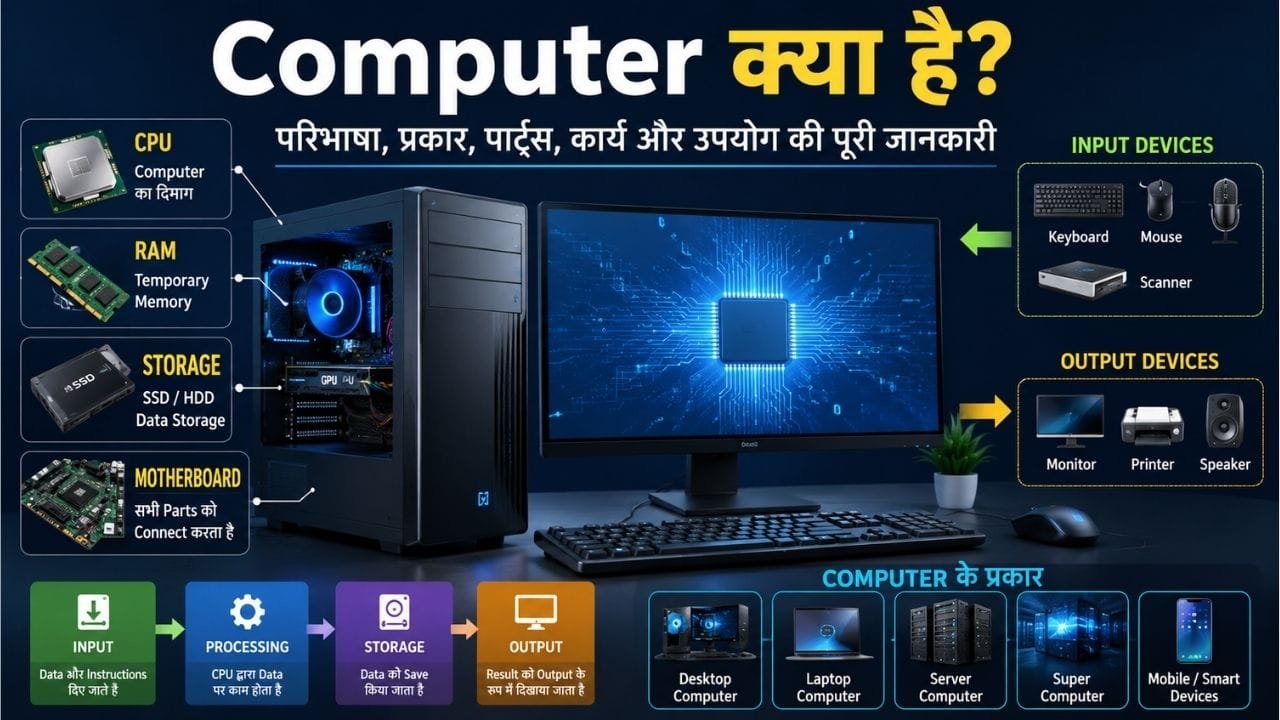
Computer एक electronic programmable device है, जो user से data और instructions input के रूप में प्राप्त करता है, उन्हें निर्धारित instructions के अनुसार process करता है, आवश्यकता के अनुसार data को store करता है और processed result को output के रूप में प्रस्तुत करता है।
सरल भाषा में कहें तो:
Computer एक ऐसी electronic machine है जो दिए गए instructions के अनुसार data पर काम करके उपयोगी result प्रदान करती है।
Computer केवल calculation करने वाली machine नहीं है। आधुनिक computers का उपयोग information को process, store, retrieve, communicate और manage करने के लिए किया जाता है। NIST के अनुसार hardware information system के physical components होते हैं, जबकि software computer programs और उनसे जुड़े data/instructions से संबंधित होता है।
एक आसान उदाहरण
मान लीजिए आपने Computer में लिखा:
500 + 250 = ?
तो:
- 500 और 250 → Input
- Calculation → Processing
- Result को memory में रखना → Storage
- 750 दिखाना → Output
इसलिए Computer की basic working को इस तरह समझ सकते हैं:
Input → Processing → Storage → Output
Computer की परिभाषा
Computer को एक programmable electronic computing device के रूप में समझा जा सकता है, जो data को instructions के अनुसार process करके result देता है।
पुराने समय में computers का इस्तेमाल मुख्य रूप से complex calculations के लिए किया जाता था, लेकिन आज computers कई तरह के काम कर सकते हैं, जैसे:
- Document बनाना|
- Internet चलाना|
- Email भेजना|
- Video देखना|
- Programming करना|
- Photo और Video Editing
- Gaming
- Data Analysis
- Online Banking
- Artificial Intelligence
- Scientific Research
इसलिए Computer को केवल “गणना करने वाली मशीन” कहना आधुनिक Computer की पूरी क्षमता को नहीं बताता।
Computer शब्द का अर्थ क्या है?
“Computer” शब्द का संबंध अंग्रेजी के Compute शब्द से माना जाता है, जिसका अर्थ गणना करना (To Calculate) है।
हिंदी में Computer को सामान्यतः कंप्यूटर कहा जाता है और इसके लिए संगणक शब्द भी इस्तेमाल किया जाता है।
हालांकि आज Computer का उपयोग केवल गणना तक सीमित नहीं है।
क्या COMPUTER का कोई Full Form होता है?
Internet पर Computer का एक कथित Full Form काफी जगह देखने को मिलता है:
C – Commonly
O – Operated
M – Machine
P – Particularly
U – Used for
T – Technical
E – Education
R – Research
लेकिन यह Computer का official या universally accepted full form नहीं है।
इसलिए इसे Computer की official definition या full form समझना सही नहीं है।
Computer एक सामान्य शब्द है, जिसका संबंध “Compute” से माना जाता है।
अगर आप इंटरनेट की बुनियादी संरचना और उसके काम करने के तरीके को समझना चाहते हैं, तो Internet क्या है और कैसे काम करता है? इस पूरी गाइड में नेटवर्क, डेटा ट्रांसफर और इंटरनेट की कार्यप्रणाली को आसान भाषा में जान सकते हैं।
Computer कैसे काम करता है?
Computer के काम करने की प्रक्रिया को समझने के लिए चार मुख्य चरण समझना जरूरी है:
1. Input
सबसे पहले Computer को data या instructions दिए जाते हैं।
Input देने के लिए अलग-अलग devices का इस्तेमाल किया जाता है, जैसे:
- Keyboard
- Mouse
- Microphone
- Scanner
- Camera
- Touchscreen
उदाहरण:
अगर आप Keyboard से अपना नाम type करते हैं, तो यह Computer के लिए Input है।
2. Processing
Input मिलने के बाद Computer उस data पर instructions के अनुसार काम करता है।
इस processing में CPU (Central Processing Unit) की महत्वपूर्ण भूमिका होती है।
उदाहरण:
अगर आपने Calculator में:
100 × 20
लिखा, तो Computer इस data को process करके result तैयार करेगा।
3. Storage
Computer data को temporary या permanently store कर सकता है।
Storage के उदाहरण:
- SSD
- HDD
- USB Drive
- Memory Card
- Cloud Storage
वहीं RAM जैसी memory processing के दौरान temporary data और instructions रखने में महत्वपूर्ण भूमिका निभाती है।
4. Output
Processing पूरी होने के बाद Computer result को user के सामने प्रस्तुत करता है।
Output devices के उदाहरण:
- Monitor
- Printer
- Speaker
- Projector
उदाहरण:
आपने Calculator में 100 × 20 लिखा और Monitor पर 2000 दिखाई दिया।
यह Output है।
Computer की Working को एक लाइन में समझें
Input → Processing → Storage → Output
यही Computer की basic working को समझने का सबसे आसान तरीका है।
हालांकि modern computing systems इससे कहीं अधिक complex होते हैं। इनमें networking, parallel processing, caching, virtualization, cloud computing और AI जैसी technologies भी शामिल हो सकती हैं।
Computer के मुख्य भाग कौन-कौन से हैं?
Computer system को समझने के लिए इसके hardware और software को समझना जरूरी है।
मुख्य रूप से Computer के components को इन भागों में समझा जा सकता है:
- Hardware
- Software
- Firmware
- Data
- User
1. Computer Hardware क्या है?
Hardware Computer के वे physical components होते हैं जिन्हें हम देख और छू सकते हैं।
NIST के अनुसार hardware किसी information system के material/physical components को कहा जाता है।
उदाहरण:
- CPU
- Motherboard
- RAM
- SSD
- HDD
- Monitor
- Keyboard
- Mouse
- Graphics Card
- Power Supply
- Printer
Computer Hardware के मुख्य Components
CPU क्या है?
CPU यानी Central Processing Unit Computer का प्रमुख processing component है।
इसे आम भाषा में Computer का “दिमाग” कहा जाता है, हालांकि technically Computer का पूरा काम केवल CPU नहीं करता।
CPU instructions को execute करता है और calculations तथा logical operations में महत्वपूर्ण भूमिका निभाता है।
Modern CPU में कई cores हो सकते हैं।
CPU के प्रमुख concepts
- Core
- Clock Speed
- Cache
- Instruction Set
- Threads
उदाहरण के लिए:
Dual-Core → 2 cores
Quad-Core → 4 cores
Octa-Core → 8 cores
लेकिन केवल cores की संख्या देखकर processor की पूरी performance तय नहीं की जा सकती। Architecture, clock behavior, cache, workload और अन्य factors भी महत्वपूर्ण होते हैं।
Motherboard क्या है?
Motherboard Computer का मुख्य circuit board होता है, जिस पर CPU, RAM, storage interfaces और अन्य components आपस में connect होते हैं।
Motherboard Computer के अलग-अलग components के बीच communication और power distribution के लिए महत्वपूर्ण होता है।
इसमें विभिन्न slots और ports हो सकते हैं, जैसे:
- RAM slots
- PCIe slots
- Storage connectors
- USB headers
- Display-related connections
- Network interface
- Power connectors
RAM क्या है?
RAM यानी Random Access Memory Computer की working memory है।
जब आप कोई application चलाते हैं, तो operating system और active programs के लिए data और instructions का कुछ हिस्सा RAM में रखा जाता है।
RAM सामान्यतः volatile memory होती है, यानी power बंद होने पर इसमें मौजूद active data बना नहीं रहता।
RAM ज्यादा होने का फायदा
पर्याप्त RAM होने से Computer को कई applications और बड़े workloads को संभालने में मदद मिल सकती है।
लेकिन ज्यादा RAM हमेशा automatically ज्यादा speed नहीं देती। Performance पर processor, storage, software और workload का भी प्रभाव पड़ता है।
ROM क्या है?
ROM यानी Read-Only Memory एक प्रकार की non-volatile memory से संबंधित term है।
Computer और electronic devices में firmware जैसी low-level instructions को रखने के लिए non-volatile memory technologies का इस्तेमाल किया जाता है।
इसलिए पुराने समय की तरह ROM को केवल “ऐसी memory जिसे कभी बदला नहीं जा सकता” कहना modern systems के संदर्भ में oversimplification हो सकता है।
Storage क्या है?
Storage का इस्तेमाल data को लंबे समय तक सुरक्षित रखने के लिए किया जाता है।
आज Computer में मुख्य रूप से:
SSD
Solid State Drive (SSD) flash memory आधारित storage होती है।
इसके सामान्य फायदे:
- तेज read/write performance
- कोई mechanical moving parts नहीं
- तेज boot और application loading
HDD
Hard Disk Drive (HDD) magnetic storage technology का उपयोग करती है और इसमें mechanical moving parts होते हैं।
HDD कई situations में large-capacity storage के लिए उपयोगी हो सकती है।
GPU क्या है?
GPU यानी Graphics Processing Unit graphics और parallel computing workloads के लिए specialized processor है।
GPU का उपयोग:
- Gaming
- 3D Rendering
- Video Editing
- Graphics
- Scientific Computing
- Machine Learning
- AI workloads
जैसे कार्यों में किया जा सकता है।
Modern GPU केवल gaming तक सीमित नहीं हैं। AI और data-intensive computing में भी इनका महत्व बहुत बढ़ गया है।
Input Devices क्या हैं?
Input devices Computer को data या commands देने के लिए इस्तेमाल किए जाते हैं।
उदाहरण:
- Keyboard
- Mouse
- Scanner
- Microphone
- Webcam
- Touchscreen
- Barcode Reader
- Graphics Tablet
Keyboard
Text, numbers और commands enter करने के लिए।
Mouse
Pointer को control करने और graphical interface में selection करने के लिए।
Microphone
Audio को input के रूप में Computer तक पहुंचाने के लिए।
Scanner
Physical documents या images को digital form में बदलने के लिए।
Output Devices क्या हैं?
Output devices Computer द्वारा processed information को user तक पहुंचाते हैं।
उदाहरण:
- Monitor
- Printer
- Speaker
- Projector
Monitor
Text, images, videos और graphical information दिखाता है।
Printer
Digital document को physical print में बदल सकता है।
Speaker
Audio output प्रदान करता है।
Software क्या है?
Software instructions, programs और associated data का collection होता है जो Computer को बताता है कि उसे क्या काम करना है।
NIST के अनुसार software computer programs और associated data से संबंधित है जो hardware पर stored और executed होते हैं।
Software को broadly तीन categories में समझ सकते हैं:
- System Software
- Application Software
- Utility Software
System Software क्या है?
System Software Computer के hardware और basic system operations को manage करने में मदद करता है।
सबसे महत्वपूर्ण उदाहरण:
Operating System
जैसे:
- Windows
- Linux
- macOS
- ChromeOS
Operating System hardware resources को manage करता है और applications को चलने के लिए environment प्रदान करता है।
Application Software क्या है?
Application Software user के specific tasks के लिए बनाया जाता है।
उदाहरण:
- Web Browser
- Word Processor
- Photo Editor
- Video Editor
- Music Player
- Accounting Software
- Games
Utility Software क्या है?
Utility software system maintenance, management या security जैसे कार्यों में सहायता कर सकता है।
उदाहरण:
- Backup software
- Disk management tools
- Security software
- File compression tools
- System monitoring tools
Firmware क्या है?
Firmware hardware के साथ closely associated low-level software/instructions होता है।
NIST के अनुसार firmware में hardware में stored programs और data शामिल हो सकते हैं जिन्हें device के execution के दौरान सामान्य software की तरह dynamically modify नहीं किया जाता।
Firmware का उपयोग कई devices में होता है:
- Motherboard
- Router
- SSD
- Printer
- Smart TV
- IoT devices
Computer के प्रकार
Computer को अलग-अलग आधार पर classify किया जा सकता है।
एक ही Computer कई classifications में आ सकता है। उदाहरण के लिए Laptop एक personal computer भी है और portable computer भी।
उद्देश्य के आधार पर Computer
General Purpose Computer
ऐसे computers जिन्हें अलग-अलग सामान्य कार्यों के लिए इस्तेमाल किया जा सकता है।
उदाहरण:
- Desktop
- Laptop
इन पर browsing, office work, entertainment, programming आदि कई काम किए जा सकते हैं।
Special Purpose Computer
ऐसे computing systems जिन्हें किसी विशेष प्रकार के काम के लिए design किया जाता है।
उदाहरण:
- Industrial control systems
- Embedded systems
- Specialized scientific systems
Data Processing के आधार पर Computer
Analog Computer
Analog computing systems continuous physical quantities को represent/process करने के लिए design किए जा सकते हैं।
इनका इस्तेमाल specialized scientific और engineering applications में हो सकता है।
Digital Computer
Digital computers data को digital form में process करते हैं।
आज के अधिकांश:
- Desktop
- Laptop
- Server
- Smartphone
digital computing systems के उदाहरण हैं।
Hybrid Computer
Hybrid computing systems में analog और digital computing की characteristics को combine किया जाता है।
इनका उपयोग specialized applications में किया जा सकता है।
Size और Computing Power के आधार पर Computer
Microcomputer
Microcomputer broadly छोटे personal या embedded computing systems की category से जुड़ा historical term है।
आज personal computers के संदर्भ में यह term उतनी common नहीं है जितनी पहले हुआ करती थी।
Minicomputer
Minicomputer एक historical computer category है जो mainframe और smaller computers के बीच के systems के लिए इस्तेमाल की जाती थी।
आज modern computing में इस term का उपयोग बहुत कम होता है।
Mainframe Computer
Mainframe computers बड़े organizations के high-volume data processing और transaction workloads के लिए design किए जाते हैं।
इनका इस्तेमाल banking, insurance, government और बड़े enterprises जैसे क्षेत्रों में हो सकता है।
Supercomputer
Supercomputer अत्यधिक high-performance computing के लिए बनाए जाते हैं।
इनका उपयोग:
- Weather Forecasting
- Climate Research
- Space Research
- Nuclear Research
- Scientific Simulation
- Engineering
- AI और Machine Learning
- Large-scale Data Processing
जैसे workloads में किया जाता है।
भारत का पहला Supercomputer कौन-सा था?
भारत के supercomputing इतिहास में PARAM 8000 एक महत्वपूर्ण milestone है।
C-DAC के अनुसार PARAM 8000 भारत का पहला Giga-scale supercomputer था, जिसे 1990 में विकसित किया गया था। इसके बाद PARAM 10000 को 1998 में विकसित किया गया।
इसलिए पुराने articles में PARAM 10000 को भारत का पहला supercomputer बताना सही नहीं है।
PARAM series में आगे PARAM Padma, PARAM Yuva और PARAM Yuva II जैसे systems भी आए।
Desktop और Laptop में क्या अंतर है?
| Feature | Desktop | Laptop |
|---|---|---|
| Portability | कम | ज्यादा |
| Battery | सामान्यतः नहीं | होती है |
| Upgrade | कई मामलों में आसान | model पर निर्भर |
| Display | अलग monitor | Built-in |
| Keyboard | अलग | Built-in |
| Power | Direct power | Battery + charger |
| Use | Desk-based | Portable |
कौन बेहतर है?
यह user की जरूरत पर निर्भर करता है।
Gaming, high-performance work और upgradeability के लिए Desktop अच्छा विकल्प हो सकता है।
Portability, study और office work के लिए Laptop ज्यादा convenient हो सकता है।
Computer और Smartphone में क्या अंतर है?
Smartphone भी एक computing device है।
लेकिन Desktop/Laptop और Smartphone में hardware, operating system, form factor, input method, power consumption और software ecosystem में अंतर होता है।
Desktop/Laptop
- बड़ी screen.
- Keyboard और mouse support.
- ज्यादा hardware expansion options.
- Desktop-class applications.
- अधिक intensive workloads के लिए suitable configurations.
Smartphone
- Touchscreen.
- Portable.
- Cellular connectivity.
- Mobile applications.
- Battery-powered operation.
इसलिए Smartphone को Computer से पूरी तरह अलग technology समझना सही नहीं है। यह भी एक प्रकार का modern computing device है।
Computer में Operating System की क्या भूमिका है?
Operating System यानी OS Computer और user/applications के बीच महत्वपूर्ण layer का काम करता है।
यह:
- Hardware resources manage करता है|
- Applications को run करने का environment देता है|
- Files और storage को manage करता है|
- Memory management करता है|
- User Interface प्रदान कर सकता है|
- Security और permissions manage करता है|
उदाहरण:
- Windows
- Linux
- macOS
NIST operating system को ऐसे software collection के रूप में describe करता है जो hardware resources manage करता है और computer programs को common services प्रदान करता है।
Computer में Data और Information क्या है?
Data raw facts या values हो सकते हैं।
उदाहरण:
100, 200, 300
जब Computer इस data को process करके meaningful result देता है, तो उसे information के रूप में समझा जा सकता है।
उदाहरण:
अगर Computer calculate करता है:
100 + 200 + 300 = 600
तो processed result user के लिए meaningful information बन जाता है।
Computer Binary Language में क्यों काम करता है?
Digital Computer internally information को binary representation में process करते हैं।
Binary में मुख्यतः दो states:
0 और 1
का उपयोग किया जाता है।
Computer hardware में electronic circuits इन binary states को represent और process करने में सक्षम होते हैं।
इसी कारण digital computing में binary representation का बहुत महत्वपूर्ण स्थान है।
Computer में Bit और Byte क्या होते हैं?
Bit
Bit digital information की सबसे छोटी basic unit मानी जाती है।
इसकी value सामान्यतः:
0 या 1
हो सकती है।
Byte
एक Byte में सामान्यतः:
8 bits
होते हैं।
Storage capacity को अक्सर इन units में व्यक्त किया जाता है:
- KB
- MB
- GB
- TB
- PB
हालांकि storage manufacturers और operating systems में decimal और binary units के कारण measurement terminology अलग दिखाई दे सकती है।
Computer में Internet की क्या भूमिका है?
Computer अकेले भी काम कर सकता है, लेकिन Internet से जुड़ने के बाद इसकी capabilities बहुत बढ़ जाती हैं।
Internet के माध्यम से Computer:
- Websites access कर सकता है|
- Email भेज सकता है|
- Cloud services इस्तेमाल कर सकता है|
- Online meetings कर सकता है|
- Files share कर सकता है|
- Online banking कर सकता है|
- Streaming कर सकता है|
- Remote servers से communicate कर सकता है|
Internet और Computer एक ही चीज नहीं हैं।
Computer एक computing device है, जबकि Internet interconnected networks का global system है।
Computer Network क्या है?
जब दो या दो से अधिक computing devices data या resources share करने के लिए connect होते हैं, तो इसे network के रूप में समझा जा सकता है।
Common network types:
- LAN
- WAN
- WLAN
- MAN
Computer networks का इस्तेमाल:
- File sharing
- Internet access
- Printer sharing
- Communication
- Server access
आदि के लिए किया जाता है।
Cloud Computing और Computer का संबंध
आज data और applications हमेशा local Computer में ही मौजूद हों, यह जरूरी नहीं है।
Cloud Computing में computing resources, storage और services remote data centers के माध्यम से उपलब्ध कराई जा सकती हैं।
उदाहरण:
- Cloud Storage
- Online Office Applications
- Cloud Backup
- Web Applications
- Cloud Servers
इससे user Internet के माध्यम से remote computing resources का इस्तेमाल कर सकता है।
Artificial Intelligence और Computer का संबंध
Artificial Intelligence (AI) Computer systems को ऐसे tasks करने में सक्षम बनाने से संबंधित field है जिनमें perception, reasoning, pattern recognition, prediction या decision-making जैसी capabilities शामिल हो सकती हैं।
आज AI के लिए Computer hardware महत्वपूर्ण है।
विशेष रूप से:
- CPU
- GPU
- Memory
- Storage
- High-speed networking
जैसे components AI workloads में महत्वपूर्ण हो सकते हैं।
Large AI models को train करने के लिए data centers में बहुत बड़े computing clusters का इस्तेमाल किया जा सकता है।
Computer का उपयोग कहाँ-कहाँ होता है?
Computer का उपयोग लगभग हर major sector में किया जाता है।
Education
- Online classes
- Research
- E-books
- Presentations
- Programming
- Digital learning
Banking
- Account management
- Transactions
- Fraud detection
- Data processing
- Online banking
Business
- Accounting
- Billing
- Inventory
- Customer management
- Data analysis
Healthcare
- Patient records
- Medical imaging
- Hospital management
- Research
Government
- Digital records
- Citizen services
- Data management
- Online applications
Science
- Scientific calculations
- Simulations
- Research
- Data analysis
Entertainment
- Movies
- Music
- Gaming
- Streaming
- Video editing
Communication
- Video calls
- Messaging
- Social media
Cyber Security
Computers का इस्तेमाल security monitoring, threat detection, encryption, digital forensics और security testing जैसे क्षेत्रों में भी किया जाता है।
Computer के फायदे
Computer के प्रमुख फायदे हैं:
1. High Speed
Computer बहुत कम समय में बड़ी मात्रा में data process कर सकता है।
2. Accuracy
सही instructions और सही data मिलने पर Computer highly accurate results दे सकता है।
3. Storage
Computer बड़ी मात्रा में digital information store कर सकता है।
4. Automation
कई repetitive tasks को software के माध्यम से automate किया जा सकता है।
5. Multitasking
Modern operating systems कई applications और processes को manage कर सकते हैं।
6. Connectivity
Network और Internet के माध्यम से Computer दुनिया भर के systems से connect हो सकता है।
7. Productivity
Office, education, business और creative work में Computer productivity बढ़ाने में मदद कर सकता है।
Computer की सीमाएं और नुकसान
Computer powerful technology है, लेकिन इसकी limitations भी हैं।
1. गलत Input से गलत Output
Computer को गलत data या गलत instructions दिए जाएं तो result भी गलत हो सकता है।
इस concept को अक्सर:
Garbage In, Garbage Out (GIGO)
के रूप में समझाया जाता है।
2. Cyber Security Risk
Computer malware, ransomware, phishing और unauthorized access जैसे cyber threats का target बन सकता है।
3. Privacy Risk
Computer में stored personal information की सुरक्षा न होने पर data exposure का खतरा हो सकता है।
4. Hardware Failure
RAM, SSD, HDD, motherboard या power-related components में समस्या आने पर system प्रभावित हो सकता है।
5. Software Problems
Operating system या applications में bugs, compatibility problems या configuration issues हो सकते हैं।
6. Power Dependency
Traditional computers को operation के लिए electrical power की आवश्यकता होती है।
Computer को सुरक्षित कैसे रखें?
Computer इस्तेमाल करते समय basic Cyber Security practices अपनाना जरूरी है।
Strong Password रखें
हर important account के लिए मजबूत और unique password रखें।
Software Update रखें
Operating System और applications को समय पर update करें।
Unknown Files से बचें
Unknown email attachments और suspicious downloads को बिना जांचे open न करें।
Backup रखें
Important files का नियमित backup रखें।
Antivirus/Security Tools का उपयोग करें
अपने operating system और जरूरत के अनुसार trusted security tools का इस्तेमाल करें।
Phishing से सावधान रहें
Fake emails, messages और websites के माध्यम से credentials चोरी किए जा सकते हैं।
Public Computer पर सावधानी रखें
Public या shared Computer पर sensitive accounts इस्तेमाल करने के बाद logout करें और personal information save न करें।
Computer खरीदते समय किन बातों का ध्यान रखें?
अगर आप नया Desktop या Laptop खरीद रहे हैं तो केवल processor का नाम देखकर decision न लें।
इन factors को देखें:
1. Processor
आपके workload के अनुसार CPU चुनें।
2. RAM
Basic office work और browsing के लिए जरूरत कम हो सकती है, जबकि editing, programming, virtualization और professional workloads में ज्यादा RAM उपयोगी हो सकती है।
3. Storage
आज SSD सामान्यतः बेहतर responsiveness देती है।
4. GPU
Gaming, 3D work, video editing और AI workloads में dedicated GPU उपयोगी हो सकता है।
5. Display
Laptop खरीदते समय:
- Resolution
- Refresh Rate
- Brightness
- Panel Type
- Color Coverage
जैसी चीजों पर ध्यान दें।
6. Battery
Laptop users के लिए battery capacity और real-world battery life महत्वपूर्ण हैं।
7. Upgradeability
RAM, SSD और अन्य components future में upgrade किए जा सकते हैं या नहीं, यह भी देखना चाहिए।
8. Ports
USB, HDMI, Ethernet, audio और अन्य required ports उपलब्ध हैं या नहीं, जांचें।
Computer Hang हो जाए तो क्या करें?
अगर Computer बार-बार hang हो रहा है तो संभावित कारण हो सकते हैं:
- RAM की कमी
- Storage लगभग full होना
- Background में बहुत ज्यादा applications
- Overheating
- Malware
- Driver problems
- Operating system issues
- Hardware failure
Basic troubleshooting
- Unnecessary applications बंद करें।
- Computer restart करें।
- Storage में पर्याप्त free space रखें।
- Operating System update करें।
- Security scan चलाएं।
- Temperature और cooling check करें।
- Problem लगातार बनी रहे तो hardware diagnostics करें।
Computer और Laptop में कौन बेहतर है?
इसका कोई universal answer नहीं है।
अगर आपकी priority है:
Portability → Laptop
Upgradeability → Desktop
Desk-based Gaming → Desktop
Travel/College/Office → Laptop
Maximum Performance per Budget → अक्सर Desktop
लेकिन actual value configuration, generation, pricing और workload पर निर्भर करती है।
Computer सीखने के लिए कौन-कौन से Topics पढ़ें?
अगर आप Computer Basics सीखना चाहते हैं तो यह sequence उपयोगी रहेगा:
- Computer क्या है?
- Computer Hardware क्या है?
- Computer Software क्या है?
- CPU क्या है?
- RAM क्या है?
- ROM क्या है?
- SSD क्या है?
- HDD क्या है?
- Motherboard क्या है?
- GPU क्या है?
- Operating System क्या है?
- Windows क्या है?
- Linux क्या है?
- Computer Network क्या है?
- Internet क्या है?
- Cyber Security क्या है?
- Malware क्या है?
- Phishing क्या है?
- Cloud Computing क्या है?
- Artificial Intelligence क्या है?
इस तरह आपका basic knowledge धीरे-धीरे advanced computing concepts तक पहुंच सकता है।
FAQs – Computer से जुड़े महत्वपूर्ण सवाल
Computer क्या है?
Computer एक programmable electronic device है जो input data और instructions को process करके output result देता है और आवश्यकता के अनुसार data store भी कर सकता है।
Computer का मुख्य काम क्या है?
Computer का मूल कार्य data को input लेना, process करना, store करना और output देना है।
Computer के मुख्य भाग कौन से हैं?
Computer के मुख्य hardware components में CPU, motherboard, RAM, storage, input devices और output devices शामिल हो सकते हैं। Software computer को instructions और functionality प्रदान करता है।
Computer का दिमाग किसे कहा जाता है?
CPU को आम भाषा में Computer का “दिमाग” कहा जाता है क्योंकि यह instructions execute करने और processing में महत्वपूर्ण भूमिका निभाता है।
RAM क्या काम करती है?
RAM active programs और data के लिए temporary working space प्रदान करती है। यह सामान्यतः volatile memory होती है।
SSD और HDD में क्या अंतर है?
SSD flash memory आधारित storage है और सामान्यतः HDD की तुलना में तेज responsiveness प्रदान करती है। HDD magnetic storage और mechanical moving parts का उपयोग करती है।
Computer कितने प्रकार के होते हैं?
Computer को purpose, data processing method, size और performance जैसे अलग-अलग आधार पर classify किया जा सकता है। Desktop, Laptop, Mainframe, Supercomputer, Analog, Digital और Hybrid इसके विभिन्न categories/examples हैं।
Laptop क्या Computer है?
हाँ। Laptop एक portable personal computer है।
Smartphone क्या Computer है?
Modern Smartphone एक computing device है। इसमें processor, memory, storage, operating system और applications होते हैं, इसलिए इसे modern computing device माना जा सकता है।
भारत का पहला Supercomputer कौन-सा था?
C-DAC के अनुसार PARAM 8000 भारत का पहला Giga-scale supercomputer था, जिसे 1990 में विकसित किया गया था।
क्या Computer बिना Software के काम कर सकता है?
Practical general-purpose computing के लिए hardware और software दोनों की आवश्यकता होती है। Software hardware को instructions और functionality प्रदान करता है।
Computer में Operating System क्यों जरूरी है?
Operating System hardware resources को manage करता है और applications को चलने के लिए environment प्रदान करता है।
Computer को सुरक्षित रखना क्यों जरूरी है?
Computer में personal files, passwords, documents और अन्य sensitive information हो सकती है। Malware, phishing और unauthorized access जैसे threats से इन्हें नुकसान हो सकता है।
Final Words
Computer केवल calculation करने वाली machine नहीं है। यह एक programmable electronic computing system है जो data को input के रूप में प्राप्त करके instructions के अनुसार process करता है, उसे store कर सकता है और result को output के रूप में प्रस्तुत करता है।
Computer की basic working को याद रखने का सबसे आसान तरीका है:
Input → Processing → Storage → Output
आज Desktop और Laptop से लेकर Servers, Smartphones, Mainframes और Supercomputers तक computing systems अलग-अलग forms में मौजूद हैं। इनका उपयोग Education, Business, Banking, Healthcare, Science, Internet, Entertainment, Cyber Security और Artificial Intelligence जैसे लगभग हर क्षेत्र में हो रहा है।
अगर आप Computer की basic knowledge को मजबूत करना चाहते हैं, तो अगला step CPU, RAM, ROM, SSD, HDD, Motherboard, GPU और Operating System जैसे topics को विस्तार से समझना होना चाहिए।


