


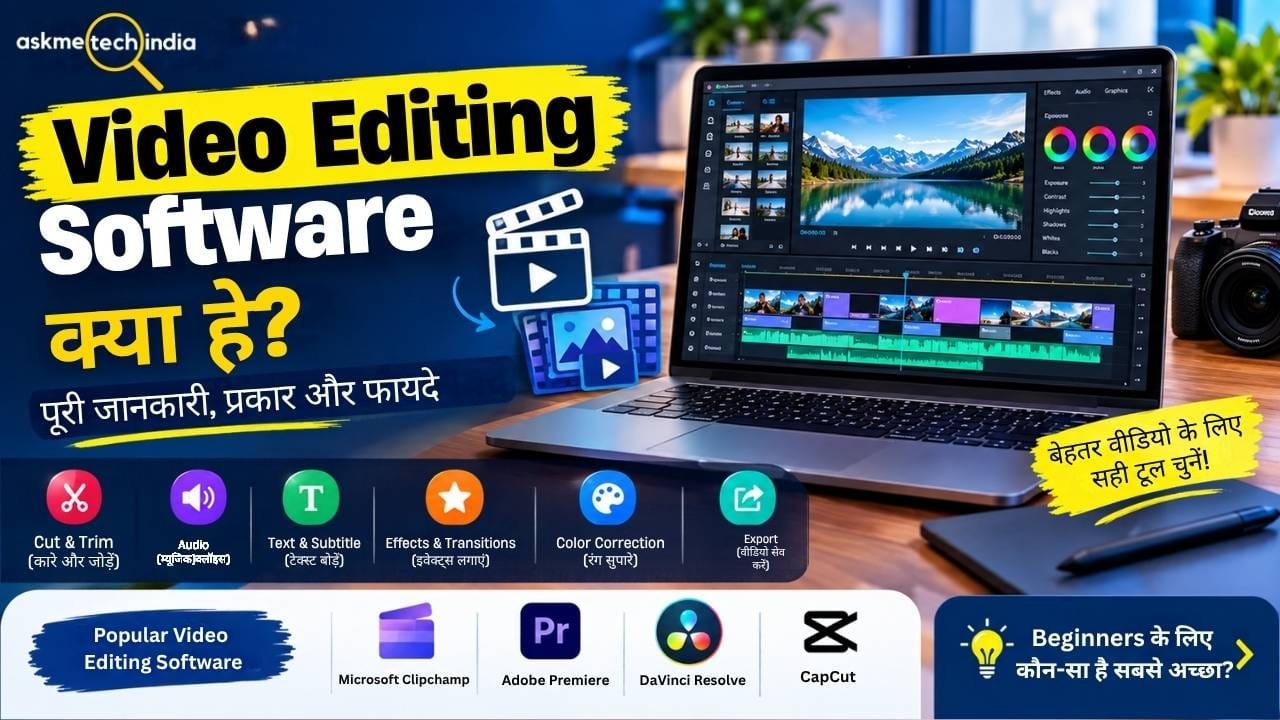
आज के समय में YouTube, Instagram, Facebook, Short Videos और Online Courses के लिए Video Content तेजी से बढ़ रहा है। लेकिन Camera या Smartphone से वीडियो रिकॉर्ड कर लेना ही काफी नहीं है। वीडियो को बेहतर बनाने के लिए उसे Cut, Trim, Crop, Merge, Music, Text, Effects, Transitions और Color Correction जैसी चीजों की जरूरत पड़ती है।
इन सभी कामों के लिए जिस Software या Application का इस्तेमाल किया जाता है, उसे Video Editing Software कहा जाता है।
इस article में हम जानेंगे कि Video Editing Software क्या है, यह कैसे काम करता है, इसके प्रकार क्या हैं, इसमें कौन-कौन से features मिलते हैं, Video Editing Software का इस्तेमाल कहां होता है और beginners के लिए कौन-कौन से options उपलब्ध हैं।
Video Editing Software क्या है?
Video Editing Software एक ऐसा computer program या application है जिसकी मदद से raw video files को edit करके एक final video तैयार किया जाता है।
इसकी मदद से आप वीडियो के unwanted हिस्से को काट सकते हैं, कई video clips को जोड़ सकते हैं, background music और voice-over लगा सकते हैं, text और subtitles जोड़ सकते हैं तथा transitions और visual effects का इस्तेमाल कर सकते हैं।
उदाहरण के लिए, आपने अपने Smartphone से 30 मिनट का वीडियो रिकॉर्ड किया। उसमें कुछ हिस्से खराब हैं और कुछ जगह खाली हैं। Video Editing Software की मदद से आप उन हिस्सों को हटाकर, जरूरी clips को जोड़कर और audio/text/effects लगाकर एक polished video बना सकते हैं।
अगर आप मोबाइल पर आसानी से वीडियो एडिट करना चाहते हैं, तो Android के लिए Best Video Editing Apps 2026 की यह गाइड पढ़ें और अलग-अलग ऐप्स के फीचर्स व उपयोग के बारे में जानें।
Video Editing Software कैसे काम करता है?
अधिकतर modern video editors में Timeline-based editing का इस्तेमाल होता है।
एक सामान्य video editing workflow कुछ इस तरह होता है:
Import → Edit → Arrange → Add Audio/Text → Effects → Color/Audio Correction → Preview → Export
1. Video Import करना
सबसे पहले Smartphone, Camera, Screen Recording या किसी दूसरे source से video files को software में import किया जाता है।
2. Timeline पर Video रखना
Imported clips को timeline पर रखा जाता है। Timeline में आप यह तय करते हैं कि कौन-सा clip वीडियो में कब दिखाई देगा।
3. Unwanted Parts हटाना
Video को trim, split या cut करके खराब या unnecessary हिस्से हटाए जाते हैं।
4. Clips को Arrange करना
अलग-अलग clips को सही order में लगाकर एक complete video बनाया जाता है।
5. Audio और Music जोड़ना
Video में:
- Background Music
- Voice-over
- Sound Effects
- Original Audio
जैसी चीजें जोड़ी जा सकती हैं।
6. Text और Effects जोड़ना
जरूरत के अनुसार title, captions, subtitles, animations, transitions और visual effects जोड़े जाते हैं।
7. Export करना
Editing पूरी होने के बाद final video को MP4 या अन्य supported format में export किया जाता है।
Video Editing Software के प्रमुख Features
Video editing software में features software के अनुसार अलग-अलग हो सकते हैं। सामान्यतः इनमें ये सुविधाएं मिल सकती हैं:
Basic Editing
- Cut
- Trim
- Split
- Crop
- Resize
- Rotate
- Merge
- Speed Control
Audio Editing
- Background Music
- Voice-over
- Audio Volume Control
- Noise Reduction
- Sound Effects
- Audio Fade In/Out
Text और Subtitle
- Text Overlay
- Titles
- Captions
- Subtitles
- Animated Text
- Font और Text Styling
Video Effects
- Filters
- Transitions
- Blur
- Zoom
- Motion Effects
- Green Screen
- Overlays
Color Editing
Advanced editors में brightness, contrast, saturation, white balance और color grading जैसे tools भी मिल सकते हैं।
AI Editing
कुछ modern video editors AI का इस्तेमाल करके editing को आसान बनाते हैं। उदाहरण के लिए automatic captions, AI voiceovers, smart editing, object masking या automated video creation जैसी सुविधाएं उपलब्ध हो सकती हैं। Adobe Premiere में AI-powered features जैसे Object Mask और Generative Extend उपलब्ध हैं, जबकि Clipchamp में AI voiceovers और AI-assisted features दिए जाते हैं।
Video Editing Software के प्रकार
Video editing software को उपयोग और complexity के आधार पर broadly अलग-अलग categories में समझा जा सकता है।
1. Basic Video Editing Software
ये software beginners के लिए बनाए जाते हैं।
इनमें सामान्यतः:
- Cut
- Trim
- Text
- Music
- Simple Effects
- Transitions
जैसे features मिलते हैं।
अगर आपको केवल YouTube Shorts, Facebook videos या simple family videos edit करने हैं, तो basic editor पर्याप्त हो सकता है।
2. Professional Video Editing Software
Professional editors और filmmakers को ज्यादा advanced control की जरूरत होती है।
इनमें:
- Advanced Timeline
- Multi-camera Editing
- Advanced Color Grading
- Professional Audio Editing
- Motion Graphics Integration
- Advanced Effects
- High-resolution Video Support
जैसे features मिल सकते हैं।
3. Mobile Video Editing Apps
Smartphone पर video editing के लिए mobile applications का इस्तेमाल किया जाता है।
इनसे आप smartphone पर ही:
- Shorts
- Reels
- YouTube Videos
- Social Media Videos
edit कर सकते हैं।
4. AI Video Editing Software
AI-based editors editing process के कुछ हिस्सों को automate कर सकते हैं।
उदाहरण के लिए:
- Automatic Captions
- AI Voiceover
- Background Removal
- Auto Reframe
- AI-assisted Editing
- Text-to-Video जैसी सुविधाएं
कुछ software में उपलब्ध हो सकती हैं।
Popular Video Editing Software कौन-कौन से हैं?
Video editing के लिए अलग-अलग जरूरत और skill level के अनुसार अलग software इस्तेमाल किए जाते हैं।
Microsoft Clipchamp
Windows 11 users के लिए Clipchamp एक महत्वपूर्ण option है। Microsoft के अनुसार Clipchamp Windows 11 में उपलब्ध official video editor है और इसमें trimming, cropping, speed control, text, transitions, effects, stock media तथा screen/webcam recording जैसी सुविधाएं मिलती हैं।
Microsoft के current information के अनुसार Clipchamp का free version watermark-free exports को 1080p तक support करता है। Paid plans में additional features और कुछ plans में 4K export जैसे options उपलब्ध हैं।
Microsoft Clipchamp की Official Website
Adobe Premiere
Adobe Premiere professional video editing के लिए इस्तेमाल किया जाने वाला advanced nonlinear editor है। इसमें precise editing, timeline workflow, media management, effects, color और audio से जुड़े advanced tools मिलते हैं।
Adobe Premiere की Official Website
DaVinci Resolve
DaVinci Resolve video editing के साथ color grading, visual effects और audio post-production जैसे workflows के लिए भी इस्तेमाल किया जाता है। Blackmagic Design के अनुसार इसका Edit page professional nonlinear editing के लिए बनाया गया है और इसमें trimming, transitions, titles और timeline management जैसे tools मिलते हैं।
DaVinci Resolve की Official Website
CapCut
CapCut desktop video editing के लिए भी उपलब्ध है और इसमें traditional editing के साथ कई AI-powered features दिए जाते हैं। इसके official information में Auto Captions, Auto Reframe और Script to Video जैसे AI features का उल्लेख है।
Beginners के लिए Video Editing Software कैसे चुनें?
Software चुनते समय केवल यह देखना पर्याप्त नहीं है कि उसमें कितने features हैं। आपको अपनी जरूरत के अनुसार software चुनना चाहिए।
YouTube के लिए
अगर आप regular YouTube videos बनाते हैं तो ऐसा editor उपयोगी रहेगा जिसमें:
- Timeline Editing
- Audio Editing
- Text
- Transitions
- Color Correction
- Multiple Video Tracks
- High-quality Export
जैसे features हों।
YouTube Shorts और Instagram Reels के लिए
Short-form content के लिए:
- Fast Editing
- Vertical 9:16 Timeline
- Captions
- Text Animation
- Effects
- Speed Control
- Auto Captions
जैसे features महत्वपूर्ण हो सकते हैं।
Professional Video के लिए
Professional projects के लिए advanced editor चुनना बेहतर होता है जिसमें color, audio, effects और media management पर ज्यादा control मिले।
Video Editing Software इस्तेमाल करने के फायदे
1. Video की Quality बेहतर होती है
Unwanted portions हटाकर और audio तथा color को सुधारकर video को ज्यादा polished बनाया जा सकता है।
2. Multiple Clips को एक Video में जोड़ सकते हैं
अलग-अलग recordings को एक timeline में जोड़कर complete video बनाया जा सकता है।
3. Audio बेहतर कर सकते हैं
Background music, voice-over और sound effects जोड़ने के साथ audio level को भी adjust किया जा सकता है।
4. Text और Subtitles जोड़ सकते हैं
Video में titles, captions और subtitles जोड़कर information को समझना आसान बनाया जा सकता है।
5. Social Media के लिए अलग Format बना सकते हैं
एक ही content को platform के अनुसार landscape, square या vertical format में तैयार किया जा सकता है।
Video Editing के लिए Computer में क्या चाहिए?
Software के अनुसार requirements अलग होती हैं। Basic editing relatively modest hardware पर भी हो सकती है, लेकिन high-resolution footage, multiple layers और advanced effects के लिए ज्यादा powerful hardware उपयोगी होता है।
एक editing PC/Laptop में सामान्यतः इन components पर ध्यान देना चाहिए:
- अच्छा Processor
- पर्याप्त RAM
- Fast SSD
- पर्याप्त Storage
- Compatible GPU
- अच्छा Display
RAM कितनी जरूरी है?
Video editing में RAM महत्वपूर्ण है क्योंकि editing के दौरान software को कई media files और applications के साथ काम करना पड़ सकता है।
Basic editing के लिए कम RAM वाले systems भी काम कर सकते हैं, लेकिन बड़े projects और advanced editing के लिए ज्यादा RAM उपयोगी हो सकती है।
GPU क्यों जरूरी है?
कुछ video editing applications GPU acceleration का इस्तेमाल rendering, playback और effects processing को तेज करने के लिए करती हैं।
इसलिए advanced editing और high-resolution projects के लिए dedicated GPU फायदेमंद हो सकता है।
Video Editing और Video Making में क्या अंतर है?
दोनों terms अक्सर एक-दूसरे के लिए इस्तेमाल होती हैं, लेकिन इनके बीच अंतर समझना उपयोगी है।
Video Making में पूरा video creation process शामिल हो सकता है—जैसे planning, recording, scripting, editing और publishing।
वहीं Video Editing मुख्य रूप से recorded video और audio को edit करके final video तैयार करने की प्रक्रिया है।
उदाहरण:
Idea → Script → Recording → Video Editing → Export → Upload
यह पूरा process Video Making है, जबकि Recording के बाद clips को cut करके final video बनाना Video Editing का हिस्सा है।
Video Editing Software और Video Editing App में क्या अंतर है?
दोनों का उद्देश्य लगभग समान हो सकता है।
- Video Editing Software: आमतौर पर PC या Mac पर इस्तेमाल होने वाले editors के लिए कहा जाता है।
- Video Editing App: Smartphone या tablet पर इस्तेमाल होने वाले applications के लिए ज्यादा इस्तेमाल होता है।
हालांकि आजकल यह distinction पूरी तरह fixed नहीं है, क्योंकि कुछ video editors desktop और web दोनों platforms पर उपलब्ध हैं।
क्या Video Editing Software Free होता है?
कुछ video editors free होते हैं, जबकि कुछ में free और paid दोनों versions होते हैं।
Free version में basic editing features मिल सकते हैं, जबकि paid version में:
- Advanced Effects
- Premium Stock Media
- Advanced AI Features
- Higher Resolution Export
- Professional Tools
जैसी अतिरिक्त सुविधाएं मिल सकती हैं।
इसलिए software install करने से पहले उसकी current pricing और feature limitations official website पर check करना बेहतर है।
क्या बिना Video Editing Software के Video बना सकते हैं?
हाँ, कुछ basic videos बिना dedicated editing software के भी बनाए जा सकते हैं। लेकिन अगर आपको video को properly cut करना, clips जोड़ना, audio सुधारना, text लगाना या effects इस्तेमाल करना है तो video editing software काफी उपयोगी होता है।
आज के smartphones और computers में basic editing tools भी मिलते हैं, लेकिन advanced projects के लिए dedicated editor ज्यादा control देता है।
Video Editing सीखने के लिए क्या करें?
अगर आप beginner हैं तो शुरुआत में advanced effects सीखने के बजाय basic editing पर ध्यान दें।
सबसे पहले ये चीजें सीखें:
- Video Import करना|
- Timeline समझना|
- Cut और Trim करना|
- Clips को Arrange करना|
- Audio Add करना|
- Text और Captions लगाना|
- Transitions इस्तेमाल करना|
- Basic Color Correction|
- Video Export करना|
इन basics के बाद धीरे-धीरे advanced effects, color grading, audio mixing और AI tools सीख सकते हैं।
Video Editing Software से जुड़े FAQs
Video Editing Software क्या होता है?
Video Editing Software ऐसा program या application है जिसकी मदद से video clips को cut, trim, combine और modify करके final video तैयार किया जाता है।
क्या Video Editing Software जरूरी है?
अगर आपको professional या properly edited video बनाना है तो video editing software बहुत उपयोगी है। Basic editing के लिए built-in tools भी पर्याप्त हो सकते हैं।
Windows 11 में कौन-सा Video Editing Software मिलता है?
Windows 11 में Microsoft Clipchamp उपलब्ध है। Microsoft इसे Windows का official video editor बताता है।
क्या Video Editing Software Free होता है?
कुछ software पूरी तरह free होते हैं, जबकि कुछ free और paid versions में उपलब्ध होते हैं। Features और export options software के अनुसार अलग होते हैं।
क्या Video Editing के लिए Graphics Card जरूरी है?
Basic editing के लिए dedicated graphics card हमेशा जरूरी नहीं होता। लेकिन high-resolution footage, complex effects और GPU-accelerated workflows के लिए dedicated GPU उपयोगी हो सकता है।
YouTube Videos बनाने के लिए Video Editing Software क्यों जरूरी है?
Editing की मदद से unwanted parts हटाए जा सकते हैं, audio बेहतर किया जा सकता है, text/subtitles जोड़े जा सकते हैं और अलग-अलग clips को एक professional-looking video में बदला जा सकता है।
Final Words
Video Editing Software आज के digital content creation का एक महत्वपूर्ण हिस्सा है। इसकी मदद से सामान्य raw footage को एक व्यवस्थित और आकर्षक final video में बदला जा सकता है।
अगर आप beginner हैं तो पहले basic editing features जैसे Cut, Trim, Split, Audio, Text और Export सीखें। इसके बाद जरूरत के अनुसार advanced effects, color grading, audio editing और AI-powered features की तरफ बढ़ सकते हैं।
Software चुनते समय केवल popularity को आधार न बनाएं। अपनी जरूरत, computer की performance, editing level, required resolution और budget को ध्यान में रखकर software चुनना ज्यादा उपयोगी है।
Windows 11 users के लिए Microsoft Clipchamp से basic editing शुरू की जा सकती है, जबकि advanced और professional workflows के लिए Adobe Premiere या DaVinci Resolve जैसे editors में अधिक विस्तृत tools उपलब्ध हैं।


